Thursday, June 5, 2014

An error occured while starting the task sequence (0x80070032).

SCCM TS failed with starting Windows 7 OSD:


Solution for this issue is to format HDD with diskpart:

1. F8 for Command prompt.
2. Diskpart
3. Select disk 0
4. clean
5. Exit

After restarting the machine TS start without to report any issue.

Tuesday, June 3, 2014

Disable Windows features on Windows 7 x64 with SCCM 2007 TS

DISM command can be used to Disable Windows features on Windows 7  with SCCM 2007 TS.

Here is the syntax for disabling Fax Services:

DISM /online /Disable-Feature /FeatureName:FaxServicesClientPackage /Quiet /NoRestart

This syntax can be added in TS component and it works for Windows 7 x86 architecture.

For Windows 7 x64, SCCM 2007 reports an error:

The operating system reported error 11: An attempt was made to load a program with an incorrect format.


In order to resolve the error, Disable 64-bit file system redirection check box should be enabled.


Thursday, May 29, 2014

SCCM 2007 OSD Build and Capture Task sequence failled during installing Windows updates

Installing Software Updates fails during Build and Capture Task sequence.
This issue can be caused from multiple reasons, requiring restarts, dependencies from other updates..etc
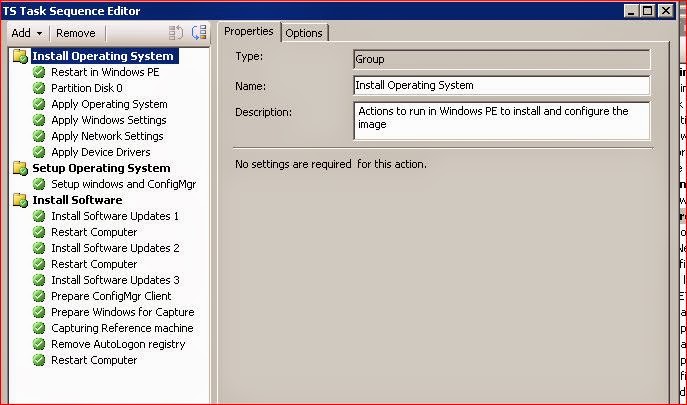
To clear all these issues, I implemented three Software updates component, configured with Continue on error followed with Restart after each Software updates component.
Using this way  all errors, restarts, after installation issues were resolved and Capture part of TS can continue without any issue.


Friday, May 23, 2014

WMI Filter for Windows 7 x86 or x64 OS

If you want to use WMI Query in SCCM TS to make difference between Windows 7 x86 and Windows 7 x64 then this WMI query should be used:

Win 7 32 bit machines:

select * from Win32_OperatingSystem WHERE Version like "6.1%" AND ProductType="1" AND NOT OSArchitecture = "64-bit"

Win 7 64Bit machines:

select * from Win32_OperatingSystem WHERE Version like "6.1%" AND ProductType="1" AND OSArchitecture = "64-bit"

Monday, April 28, 2014

SCCM 2007 Build and Capture Task Sequence with Software update failed

During Build and Capture Task Sequence, Software update installing is failing and Capture of the image does not start.
smsts.log file shows following error:

!sVolumeID.empty(), HRESULT=80004005
!sTSMDataPath.empty(), HRESULT=80070002
TS::Utility::GetTSMDataPath( sDataDir ), HRESULT=80070002
Failed to set log directory. Some execution history may be lost.
The system cannot find the file specified. (Error: 80070002; Source: Windows)
Executing task sequence
!sVolumeID.empty(), HRESULT=80004005
!sTSMDataPath.empty(), HRESULT=80070002
Task Sequence environment not found

This issue is reported by Microsoft: http://support.microsoft.com/kb/2894518

Here is the explanation of the cause from MS:

The first restart that is initiated by the software update is controlled by the task sequence. However, the second restart request is initiated by a Windows component (typically, Component-Based Servicing) and therefore is not controlled by the task sequence. Because the second restart is not controlled by the task sequence, the task sequence execution state is not saved before the restart. When the task sequence resumes after the second restart, no state is available to continue successfully.
______________________________________________________

To resolve this issue, it is recommended to remove following updates:
2862330 MS13-081: Description of the security update for 2862330: October 8, 2013
2771431 A servicing stack update is available for Windows 8 and Windows Server 2012
2871777 A servicing stack update is available for Windows RT, Windows 8, and Windows Server 2012: September 2013
2821895 A servicing stack update is available for Windows RT and Windows 8: June 2013
2545698 Text in some core fonts appears blurred in Internet Explorer 9 on a computer that is running Windows Vista, Windows Server 2008, Windows 7, or Windows Server 2008 R2
2529073 Binary files in some USB drivers are not updated after you install Windows 7 SP1 or Windows Server 2008 R2 SP1
2871690 Microsoft security advisory: Update to revoke noncompliant UEFI boot loader modules


In my case I had only 2862330 and 2529073. After their removal TS finished successfully.


Monday, April 7, 2014

BIOS/TCG Memory Overwrite Control: Error changing value

As a result of not properly restarted, the machine cannot boot and it asks for BitLocker recovery password. Turning off and turning on the machine enables Windows to start properly. 
The machine is Windows 7 with BitLocker encrypted HDD.


This specified error appears in System Log in Event Viewer:

BIOS/TCG Memory Overwrite Control: Error changing value


The Event ID: 24626 is explained in Technet:

http://technet.microsoft.com/en-us/library/cc733884(v=ws.10).aspx

Microsoft recommends to Revert or to Upgrade Computer BIOS.


Wednesday, April 2, 2014

BitLocker and repair-bde

In a case of  HDD damaging and failing BitLocker Encryption where the status of the partition is unknown then repair-bde command for recovering folders and files can be used on Windows 7.

For testing purposes I was repairing D: partition using repair-bde D: U: -rp (BitLocker Recoverry password) -Force

The content of D: was restored to U: partition which is external drive.
-rp switch is BitLocker Recovery Password.
 -Force is switch to force moving files from D: to U: because they are locked.


repair-bde usage:


repair-bde[.exe] InputVolume
                  { OutputVolumeOrImage | {-NoOutputVolume|-nov} }
                  { {-RecoveryPassword|-rp} NumericalPassword |
                    {-RecoveryKey|-rk} PathToExternalKeyFile }
                  [{-KeyPackage|-kp} PathToKeyPackage]
                  [{-LogFile|-lf} PathToLogFile]
                  [{-?|/?}]

Description:
  Attempts to repair or decrypt a damaged BitLocker-encrypted volume using th
  supplied recovery information.

  WARNING! To avoid additional data loss, you should have a spare hard drive
  available. Use this spare drive to store decrypted output or to back up the
  contents of the damaged volume.

Parameters:
  InputVolume
                The BitLocker-encrypted volume to repair. Example: "C:".

  OutputVolumeOrImage
                Optional. The volume to store decrypted contents, or the file
                location to create an image file of the contents.
                Examples: "D:", "D:\imagefile.img".

                WARNING! All information on this output volume will be
                overwritten.

  -nov or -NoOutputVolume
                Attempt to repair a BitLocker-encrypted volume by modifying t
                boot sector to point to a valid copy of BitLocker metadata.

                WARNING! To avoid additional data loss, use a sector backup
                utility to back up the input volume before using this option.
                If you do not have such a utility available, specify an outpu
                volume or image instead.

  -rk  or -RecoveryKey
                Provide an external key to unlock the volume.
                Example: "F:\RecoveryKey.bek".

  -rp  or -RecoveryPassword
                Provide a numerical password to unlock the volume.
                Example: "111111-222222-333333-...".

  -kp  or -KeyPackage
                Optional. Provide a key package to unlock the volume.
                Example: "F:\ExportedKeyPackage"

            If this option is blank, the tool will look for the key package
            automatically. This option is needed only if required by the tool

  -lf  or -LogFile
                Optional. Provide a path to a file that will store progress
                information. Example: "F:\log.txt".

  -f   or -Force
                Optional. When used, forces a volume to be dismounted even if
                it cannot be locked. This option is needed only if required b
                the tool.

  -?   or /?
                Shows this screen.

Examples:
  repair-bde C: -NoOutputVolume -rk F:\RecoveryKey.bek -Force
  repair-bde C: D: -rp 111111-222222-[...] -lf F:\log.txt
  repair-bde C: D: -kp F:\KeyPackage -rp 111111-222222-[...]
  repair-bde C: D:\imagefile.img -kp F:\KeyPackage -rk F:\RecoveryKey.bek